Cloud-Native Architecture with Terraform and AWS
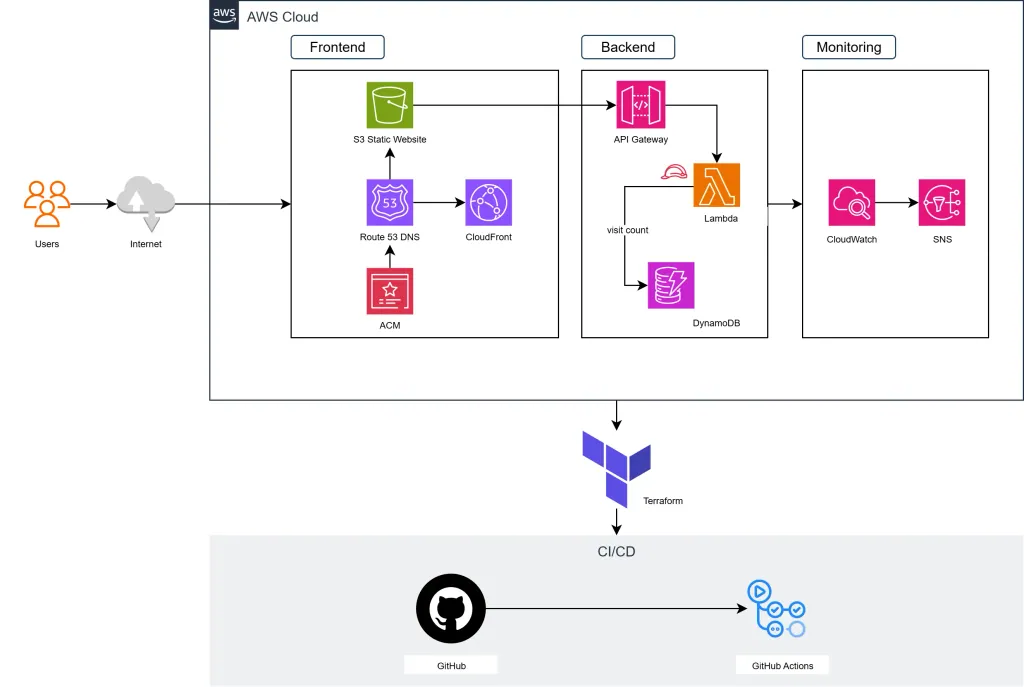
Ever wondered what goes into building a modern, scalable web application on AWS? This post explores the architecture of a cloud-native project I designed using Infrastructure as Code, serverless computing, and modern DevOps practices.
I’ll walk you through the complete architecture, from the Terraform modules that provision AWS resources to the serverless backend that powers real-time features. Whether you’re an aspiring cloud engineer or curious about modern web architecture, this post will give you insights into building production-ready applications on AWS.
The Vision: Goals and Objectives
When designing this architecture, I had several goals in mind:
- Showcase real-world skills: Demonstrate proficiency with modern cloud technologies
- Performance first: Sub-second load times globally through CDN
- Cost optimisation: Serverless architecture with pay-per-use billing
- Security: End-to-end encryption and least-privilege access
- Observability: Comprehensive monitoring and alerting
- Infrastructure as Code: Fully automated, version-controlled deployments
The result is an architecture that demonstrates cloud-native design, DevOps best practices, and modern web development patterns.
Architecture Overview
The application follows a three-tier serverless architecture on AWS:
Frontend Layer
- S3 Static Website Hosting: Serves the web application
- CloudFront CDN: Global content delivery with edge caching
- Route 53: DNS management with health checks
- ACM: SSL/TLS certificates for secure connections
Backend Layer
- API Gateway: RESTful API with rate limiting and CORS
- Lambda Functions: Serverless compute for business logic
- DynamoDB: NoSQL database for data persistence
Operations Layer
- CloudWatch: Metrics, logs, and custom dashboards
- SNS: Alert notifications via email
- IAM: Granular access control and security policies
Infrastructure as Code with Terraform
The entire infrastructure is defined and managed using Terraform, organised into three modular components:
Module 1: Frontend Infrastructure
module "front-end" {
  source = "./modules/front-end"

  domain_name = "example.com"
  bucket_name = "example.com"
  environment = "production"

  tags = {
    Environment = "production"
    Project     = "web-app"
    ManagedBy   = "terraform"
  }
}
Key Components:
- S3 Bucket Configuration: Static website hosting with versioning, encryption, and public read access
- CloudFront Distribution: Global CDN with custom domain, SSL termination, and caching policies
- Route 53 Hosted Zone: DNS management with A records pointing to CloudFront
- ACM Certificate: SSL/TLS certificate with automatic validation
Why This Approach?
- Global Performance: CloudFront’s edge locations ensure fast loading worldwide
- Cost Effective: S3 storage costs are minimal for static assets
- Scalable: Handles traffic spikes without additional configuration
- Secure: HTTPS by default with modern TLS protocols
Module 2: Backend Services
module "back-end" {
  source = "./modules/back-end"

  environment = "production"

  tags = {
    Environment = "production"
    Project     = "web-app"
    ManagedBy   = "terraform"
  }
}
Key Components:
- API Gateway: RESTful API with CORS, throttling, and stage management
- Lambda Function: Python 3.13 runtime for business logic
- DynamoDB Table: Pay-per-request pricing with on-demand scaling
- IAM Roles: Least-privilege access policies
Example Lambda Logic — Visitor Counter:
import json
import boto3
from decimal import Decimal

def lambda_handler(event, context):
    dynamodb = boto3.resource('dynamodb')
    table = dynamodb.Table('visitor_count')

    try:
        # Atomic increment operation
        response = table.update_item(
            Key={'PK': 'VISITOR_COUNT'},
            UpdateExpression='ADD visitor_count :val',
            ExpressionAttributeValues={':val': 1},
            ReturnValues='UPDATED_NEW'
        )

        count = int(response['Attributes']['visitor_count'])

        return {
            'statusCode': 200,
            'headers': {
                'Access-Control-Allow-Origin': '*',
                'Access-Control-Allow-Headers': 'Content-Type',
                'Access-Control-Allow-Methods': 'GET, POST, OPTIONS'
            },
            'body': json.dumps({'count': count})
        }

    except Exception as e:
        return {
            'statusCode': 500,
            'body': json.dumps({'error': str(e)})
        }
Module 3: Monitoring and Observability
module "monitoring" {
  source = "./modules/monitoring"

  lambda_function_name = module.back-end.lambda_function_name
  api_gateway_name     = module.back-end.api_gateway_name
  dynamodb_table_name  = "visitor_count"
  alert_email          = "alerts@example.com"
}
Comprehensive Monitoring:
- CloudWatch Alarms: Monitor Lambda errors, DynamoDB throttling, and API Gateway 4xx/5xx errors
- Cost Monitoring: Alerts when monthly costs exceed thresholds
- Performance Metrics: Track response times and success rates
- SNS Notifications: Immediate email alerts for critical issues
Deployment Pipeline
The deployment process follows Infrastructure as Code best practices:
1. Terraform State Management
terraform {
  backend "s3" {
    bucket = "terraform-state-bucket"
    key    = "app/terraform.tfstate"
    region = "eu-west-1"
  }
}
2. Multi-Provider Configuration
provider "aws" {
  alias  = "us_east_1"
  region = "us-east-1"  # Required for CloudFront certificates
}

provider "aws" {
  region = "eu-west-1"  # Primary region
}
3. Deployment Commands
# Initialise Terraform
terraform init

# Plan infrastructure changes
terraform plan

# Apply changes
terraform apply

# Build and deploy frontend
npm run build
aws s3 sync dist/ s3://your-bucket --delete

# Invalidate CloudFront cache
aws cloudfront create-invalidation --distribution-id $DISTRIBUTION_ID --paths "/*"
Security Implementation
Security is built into every layer of the architecture:
Network Security
- HTTPS Everywhere: All traffic encrypted in transit
- CORS Policies: Restricted cross-origin requests
- CloudFront Security Headers: X-Frame-Options, X-Content-Type-Options
Access Control
- IAM Roles: Lambda functions use execution roles with minimal permissions
- Resource-Based Policies: S3 buckets and DynamoDB tables have restrictive access policies
- API Gateway Throttling: Rate limiting to prevent abuse
Data Protection
- S3 Encryption: Server-side encryption (AES-256) for all objects
- DynamoDB Encryption: Encryption at rest and in transit
- Certificate Management: Automatic SSL certificate renewal
Performance Optimisations
Frontend Optimisations
- Code Splitting: Lazy loading of route components
- Asset Optimisation: Compressed images (WebP format)
- Bundle Analysis: Tree shaking and dead code elimination
- CDN Caching: Aggressive caching policies for static assets
Backend Optimisations
- Lambda Cold Starts: Optimised runtime and minimal dependencies
- DynamoDB Performance: Single-table design with efficient access patterns
- API Gateway Caching: Response caching for static data
Monitoring Results
- Page Load Speed: Sub-second initial load times
- Global Performance: Consistent performance across continents
- Availability: 99.9% uptime tracked via CloudWatch
Key Learnings
Building this architecture taught me valuable lessons about cloud-native development:
Technical Insights
- Terraform Modules: Modular infrastructure is easier to maintain and reuse
- Serverless Benefits: Pay-per-use pricing and automatic scaling are game-changers
- CloudFront Power: A global CDN dramatically improves user experience
- Monitoring Importance: Proactive alerting prevents issues before users notice
Best Practices
- Infrastructure as Code: Version-control your infrastructure alongside your application
- Security by Design: Implement security measures from day one, not as an afterthought
- Cost Optimisation: Monitor and optimise costs continuously
- Documentation: Comprehensive documentation saves time and enables collaboration
Conclusion
This architecture demonstrates that modern web applications can be built with enterprise-grade infrastructure while remaining cost-effective and maintainable. By leveraging Terraform for Infrastructure as Code, AWS serverless services, and cloud-native best practices, you can create robust, scalable solutions that handle traffic spikes while maintaining consistent global performance.
Whether you’re building your first cloud application or looking to modernise existing infrastructure, the patterns and practices covered here provide a solid foundation for cloud-native development.